| Item | Detail |
|---|---|
| Document reference | JHC-UG-08 |
| Version | 0.1 |
| Status | Draft for review. Section 2 is suitable for customers; sections 3 and 4 are internal |
| Prepared | 27 October 2026 |
| Application version documented | Portal 0.3.0, commit 4d7b861 plus uncommitted working-tree changes of 27 Oct 2026 |
| Document owner | To be assigned (JHC) |
| Approver | To be assigned |
| Effective date | Not set: draft |
| Related documents | Customer Manual (JHC-UG-01), Staff Manual (JHC-UG-02), Administrator Manual (JHC-UG-03) |
Table 1: Revision history
| Version | Date | Change | By |
|---|---|---|---|
| 0.1 | 27 Oct 2026 | First troubleshooting guide | Prepared with Claude (AI assistant) for JHC review |
1. Before you report a problem
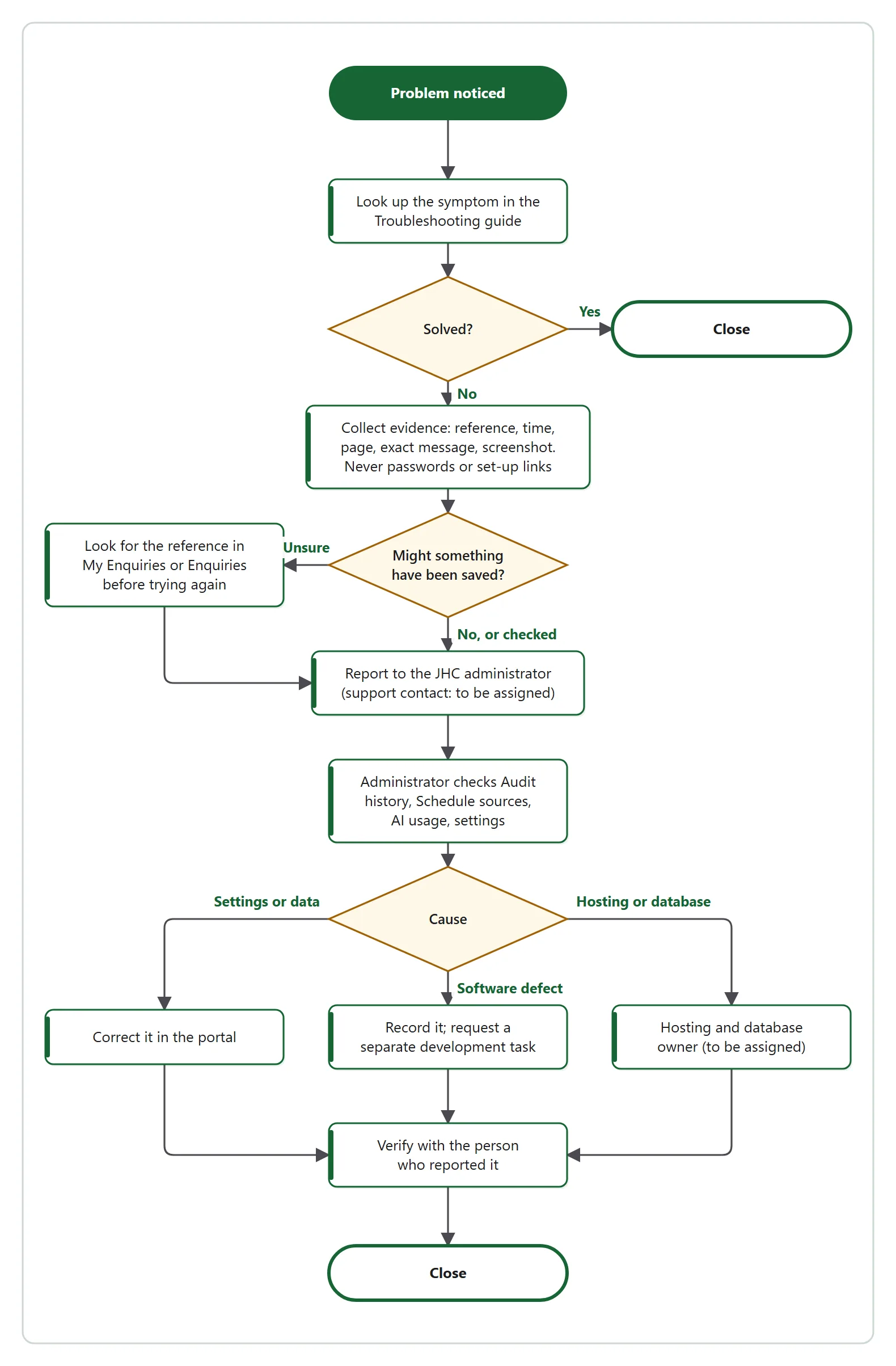
Evidence to collect: the reference (enquiry, quotation or rate ID), the date and time, the page, the exact message (copy it or take a screenshot with Win + Shift + S), and what you did just before. Never include passwords, set-up links or keys.
Warning: If you are not sure whether something was saved, check before trying again. Signed-in customers: open My Enquiries. Staff: search the reference, company or email in Enquiries. A visitor who is not signed in should contact JHC with the time they sent it. Submitting twice creates two enquiries.
Support contact: to be assigned by JHC (the portal footer will show the support email, phone and hours once the administrator enters them in Appearance).
2. Customers and all users
Table 2: Common problems
| Problem | Possible cause | User checks | Recovery | Escalation | Evidence |
|---|---|---|---|---|---|
| Cannot sign in: "The email or password is incorrect…" | Wrong email or password; caps lock | Retype carefully; check the email JHC used | Ask JHC for a new set-up link | JHC administrator | Time, email used (not the password) |
| Set-up link says "expired or has already been used" | Link already used or too old | — | Ask for a new link | JHC administrator | Time |
| "Too many attempts" or similar after several tries | Sign-in limit protecting the account | Wait | Try later | JHC administrator if it persists | Time |
| Page says "no access" | Your account does not include that area | You are signed in with the right account | Use the menu items you have | Staff: administrator | Page address |
| Schedule search shows "No sailings found" | That source has nothing for these dates or ports | Widen the dates; check the ports | Enquire anyway | — | Search details |
| A source shows "Provider unavailable" | The provider failed or refused | Try later | Use other sections; enquire | Staff: administrator (Schedule sources) | Time, route |
| "Out of date" warning on schedules | Live call failed; last permitted copy shown | Note the retrieval time | Confirm with JHC before relying on it | — | Screenshot |
| No price shown, "Price on request" | No published price for visitors, or an on-request service | Sign in to see agreed rates | Send an enquiry | — | Service name |
| A price looks expired or wrong | Rate validity ended; or a pricing error | Check validity dates | Enquire; JHC confirms in a quotation | Staff: Pricing manager | Service, price, time |
| "There are n problems to fix" on the enquiry form | Missing or invalid fields | Click each problem | Fix and submit again; nothing was saved | — | — |
| Enquiry form: a file is refused | Wrong type, over 10 MB, more than 5 files, or content does not match the name | Check the file | Remove it (Remove), use PDF/JPEG/PNG/XLSX/CSV/DOCX | JHC if a valid file is refused | File name, type, size |
| Submit seemed to hang | Slow connection or server | Do not resubmit yet. Check My Enquiries | If absent after a few minutes, submit again | JHC if unsure | Time |
| Cannot find an enquiry | Different company account; visitor enquiry not linked to an account | Check you are signed in with the company account | Ask JHC with the reference | JHC | Reference |
| Cannot respond to a quotation | Not the current version, validity ended, or already responded | Check Valid until and the version | Contact JHC | JHC | Quotation number |
| Quotation PDF differs from the screen | Viewing an older version | Check the version number on both | Download the current version | JHC | Quotation number, version |
| Assistant ("Describe your requirement") gives a message or nothing | Switched off, busy, over a limit, or failed | — | Fill in the form yourself | — | Time |
| Theme or time zone did not stay | Preference not saved, or a different account | Look for "Saved to your account." | Choose again | JHC | Browser, time |
3. Staff
Table 3: Staff problems
| Problem | Possible cause | Checks | Recovery | Escalation | Evidence |
|---|---|---|---|---|---|
| "Write what information you need from the customer" | Awaiting information needs a message | — | Write the message, Save status | — | — |
| Price check says a rule "JHC has not configured" | Volumetric factor, revenue ton or part-month storage not supplied | — | Enter the quantity yourself or price by hand | Management to supply the rule | Enquiry ref |
| Price check: "missing input" | The enquiry lacks a value | — | Ask the customer (STF-06) | — | Enquiry ref |
| Cannot submit a quotation | No legal entity; validity date missing; a rate has ended; totals mismatch | Read the message | Fix; replace ended rates | Administrator (legal entity) | Quotation number |
| Approval refused | You prepared or submitted it; or the version changed after you opened it | Read the notice | Another approver; reload and review again | Sales manager / Administrator | Quotation number |
| Rate not published: "it would overlap R-…" | Another published rate covers the same service, route, customer and dates | Open the named rate | Withdraw one, or make the route or dates specific | Pricing manager | Both rate IDs |
| Rate approval cleared | Price or terms changed after approval | — | Submit again | — | Rate ID |
| CSV import: "Fix the errors, then check the file again" | Unknown unit or service, bad date, formula-like cell | Read each line's error | Correct the file; check again | Pricing manager | File, line numbers |
| Page slow after a save | Database busy | Wait; reload once | Check the history to see if the change is there before repeating | Administrator | Time, action |
| Ask the assistant gives a plain message | Off, stopped, busy, limit or budget reached, or provider failure | — | Use the missing-information check | Administrator | Time |
4. Administrators
Table 4: Administrator problems
| Problem | Possible cause | Checks | Recovery | Escalation |
|---|---|---|---|---|
| Appearance not saved | Contrast check blocked the colours; dialog cancelled | Read the reason next to the save button | Choose a preset or adjust colours; Save and apply… → Apply changes | Developer if refused without a reason |
| Provider "Not connected" | Key not set on the server | Schedule sources shows key Present or not | Hosting owner sets the key in the secret store | Technical owner |
| Wider display of a provider refused | Licence confirmation not recorded | — | Record the written licence confirmation first | Management |
| AI settings "could not be loaded" | Database update not applied | — | Hosting owner runs npm run db:migrate then npm run db:verify | Technical owner |
| "Settings could not be loaded" / database unreachable | Development database paused after inactivity; outage | /health page | Wake or restore the database | Technical owner |
Known open issue (launch blocker 15): in the automated test set-up on the development PC, some saves are intermittently slow or stuck. The cause is not proven, and saves on the real database must be confirmed during acceptance testing. Report any save that does not complete, with the time.