| Item | Detail |
|---|---|
| Document reference | JHC-UG-08 |
| Version | 0.1 |
| Status | Draft for review. Section 2 is suitable for customers; sections 3 and 4 are internal |
| Prepared | 27 October 2026 |
| Application version documented | Portal 0.3.0, commit 4d7b861 plus uncommitted working-tree changes of 27 Oct 2026 |
| Document owner | To be assigned (JHC) |
| Approver | To be assigned |
| Effective date | Not set: draft |
| Related documents | Customer Manual (JHC-UG-01), Staff Manual (JHC-UG-02), Administrator Manual (JHC-UG-03) |
Table 1: Revision history
| Version | Date | Change | By |
|---|---|---|---|
| 0.1 | 27 Oct 2026 | First troubleshooting guide | Prepared with Claude (AI assistant) for JHC review |
1. Before you report a problem
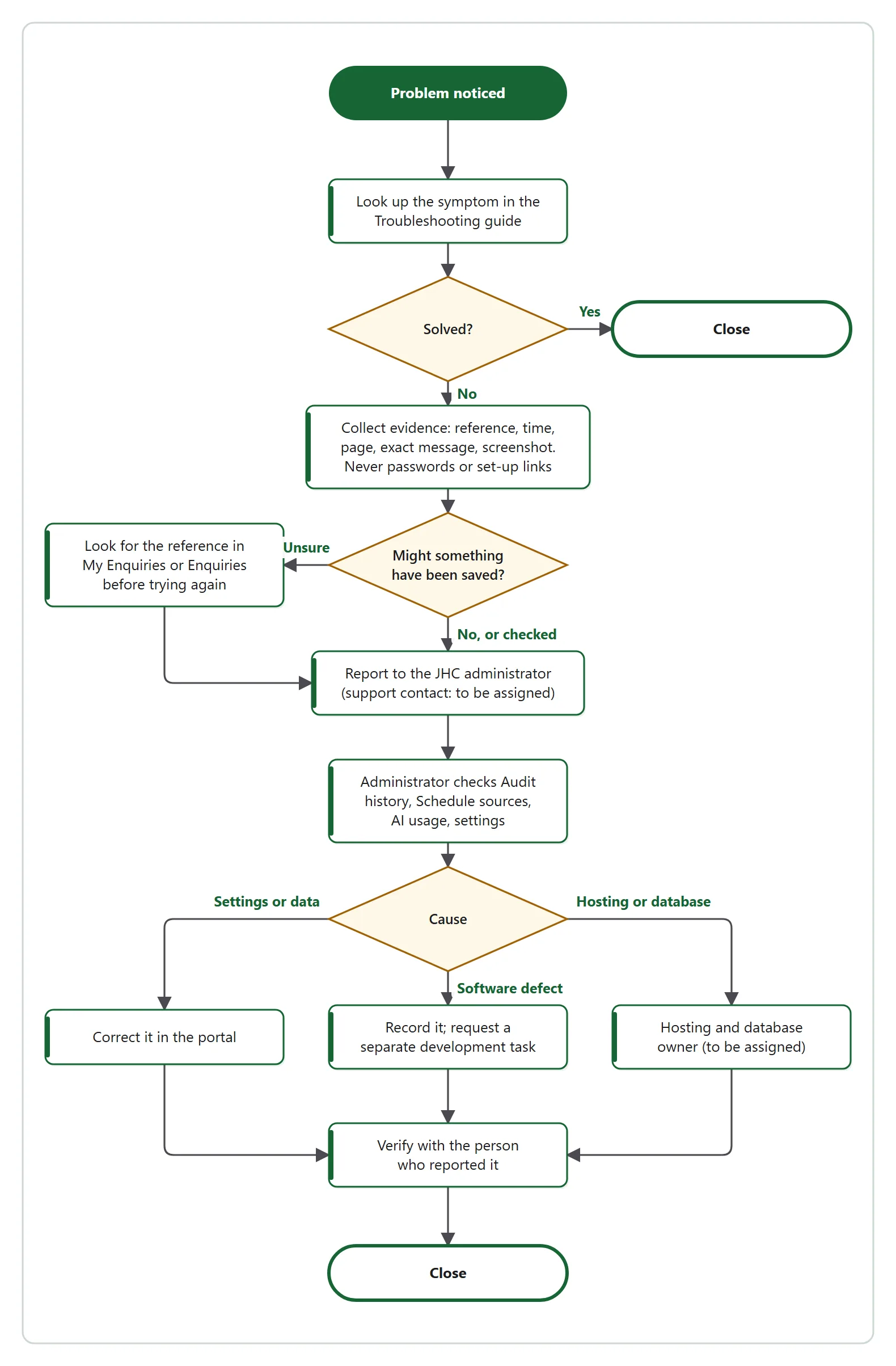
Evidence to collect: the reference (enquiry, quotation or rate ID), the date and time, the page, the exact message (copy it or take a screenshot with Win + Shift + S), and what you did just before. Never include passwords, set-up links or keys.
Warning: If you are not sure whether something was saved, check before trying again. Signed-in customers: open My Enquiries. Staff: search the reference, company or email in Enquiries. A visitor who is not signed in should contact JHC with the time they sent it. Submitting twice creates two enquiries.
Support contact: to be assigned by JHC (the portal footer will show the support email, phone and hours once the administrator enters them in Appearance).
2. Customers and all users
Table 2: Common problems
| Problem | Possible cause | User checks | Recovery | Escalation | Evidence |
|---|---|---|---|---|---|
| Cannot sign in: "The email or password is incorrect…" | Wrong email or password; caps lock | Retype carefully; check the email JHC used | Ask JHC for a new set-up link | JHC administrator | Time, email used (not the password) |
| Set-up link says "expired or has already been used" | Link already used or too old | — | Ask for a new link | JHC administrator | Time |
| "Too many attempts" or similar after several tries | Sign-in limit protecting the account | Wait | Try later | JHC administrator if it persists | Time |
| Page says "no access" | Your account does not include that area | You are signed in with the right account | Use the menu items you have | Staff: administrator | Page address |
| Schedule search shows "No sailings found" | That source has nothing for these dates or ports | Widen the dates; check the ports | Enquire anyway | — | Search details |
| A source shows "Provider unavailable" | The provider failed or refused | Try later | Use other sections; enquire | Staff: administrator (Schedule sources) | Time, route |
| "Out of date" warning on schedules | Live call failed; last permitted copy shown | Note the retrieval time | Confirm with JHC before relying on it | — | Screenshot |
| No price shown, "Price on request" | No published price for visitors, or an on-request service | Sign in to see agreed rates | Send an enquiry | — | Service name |
| A price looks expired or wrong | Rate validity ended; or a pricing error | Check validity dates | Enquire; JHC confirms in a quotation | Staff: Pricing manager | Service, price, time |
| "There are n problems to fix" on the enquiry form | Missing or invalid fields | Click each problem | Fix and submit again; nothing was saved | — | — |
| Enquiry form: a file is refused | Wrong type, over 10 MB, more than 5 files, or content does not match the name | Check the file | Remove it (Remove), use PDF/JPEG/PNG/XLSX/CSV/DOCX | JHC if a valid file is refused | File name, type, size |
| Submit seemed to hang | Slow connection or server | Do not resubmit yet. Check My Enquiries | If absent after a few minutes, submit again | JHC if unsure | Time |
| Cannot find an enquiry | Different company account; visitor enquiry not linked to an account | Check you are signed in with the company account | Ask JHC with the reference | JHC | Reference |
| Cannot respond to a quotation | Not the current version, validity ended, or already responded | Check Valid until and the version | Contact JHC | JHC | Quotation number |
| Quotation PDF differs from the screen | Viewing an older version | Check the version number on both | Download the current version | JHC | Quotation number, version |
| Assistant ("Describe your requirement") gives a message or nothing | Switched off, busy, over a limit, or failed | — | Fill in the form yourself | — | Time |
| Theme or time zone did not stay | Preference not saved, or a different account | Look for "Saved to your account." | Choose again | JHC | Browser, time |