| Item | Detail |
|---|---|
| Document reference | JHC-SOP-02 |
| Version | 0.1 |
| Status | Draft for review · Internal: contains supplier-cost and approval information |
| Prepared | 27 October 2026 |
| Application version documented | Portal 0.3.0, commit 4d7b861 plus uncommitted working-tree changes of 27 Oct 2026 (JHC-REG-03) |
| Audience | Pricing managers, Sales managers, Sales, Administrators |
| Document owner | To be assigned (JHC pricing) |
| Approver | To be assigned |
| Effective date | Not set: draft |
| Related documents | PRICING_RULES.md (rules as built), docs/RATE_GUIDE.md and docs/QUOTATION_GUIDE.md (earlier guides, still valid), Staff User Manual (JHC-UG-02), Worked Examples (JHC-UG-13) |
Table 1: Revision history
| Version | Date | Change | By |
|---|---|---|---|
| 0.1 | 27 Oct 2026 | First SOP combining the rate and quotation guides, with the approval matrix, missing-rate escalation and a returned-rate example | Prepared with Claude (AI assistant) for JHC review |
1. Purpose, scope and rules that are configured
Purpose: make sure every price a customer sees, and every quotation JHC issues, comes from an approved, published, in-date rate or an approved hand-priced line.
Scope: service catalogue, rates (standard and customer-specific), supplier costs, CSV import, quotation preparation, approval, issue and revision.
Configured rules versus proposed policies. This SOP describes only what the portal enforces today. JHC has not supplied: discount or margin thresholds, tax codes, the air volumetric factor, the LCL weight/measure conversion, or part-month storage rules. The portal never invents them. Services that need them show "Request quotation" or must be priced by hand.
Table 2: Price layers (who sees what)
| Layer | Example | Who sees it | Where |
|---|---|---|---|
| Supplier cost | What a haulier charges JHC | Administrator, Pricing manager only | Supplier costs; never in customer pages, exports or PDFs |
| Standard selling price | Pallet storage, MYR per pallet per month | Public or staff only, as set on the rate | Rate management (standard price list) |
| Customer-specific price | Demo Customer A's agreed storage price | That customer's users and authorised staff | Rate management (customer's price list) |
| Quotation price | The line on an issued quotation | That customer and staff | The quotation (values copied; later rate changes never alter it) |
Table 3: Approval matrix (as configured)
| Item | Prepares | Approves | Publishes / issues | Segregation enforced? |
|---|---|---|---|---|
| Rate (any price list) | Pricing manager, Administrator | Pricing manager, Administrator | Pricing manager, Administrator | No: the same person may draft and approve (gap G-05) |
| Quotation version | Sales, Sales manager, Administrator | Sales manager, Administrator | Preparer issues after approval | Yes: never the preparer or submitter; cannot be switched off |
| Discounts | Preparer (as a separate line) | Through the quotation approval | — | No thresholds configured |
| Payment terms wording | Administrator (Business settings) | — | — | Only approved wording can be chosen |
2. Service catalogue
PRC-01 Create, edit, show or hide a service
| Who | Pricing manager, Administrator ("Edit the service catalogue") |
| Status | A · Verified |
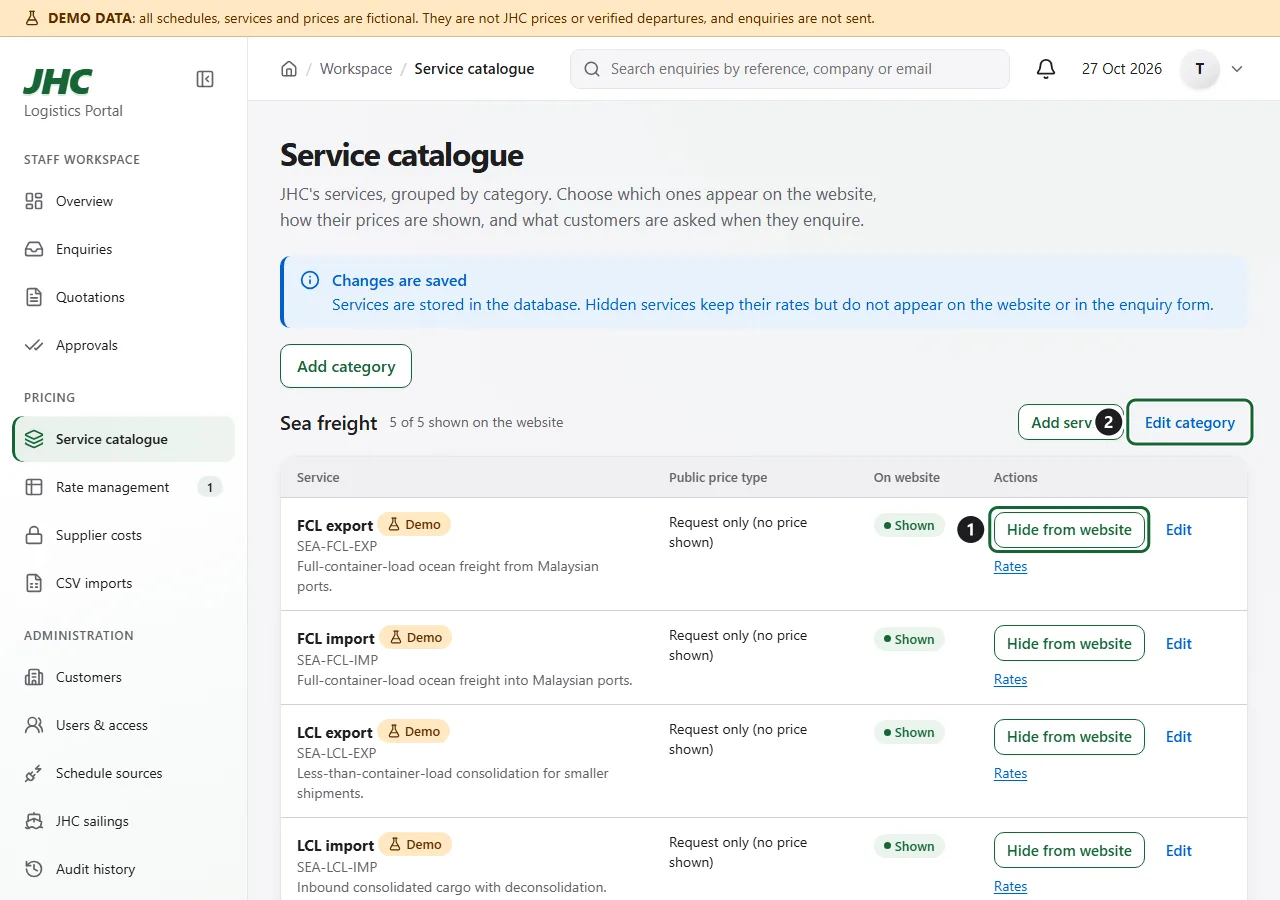
Table 4: PRC-01 actions
| Need | Action | Effect |
|---|---|---|
| Show a service on the website | Show on website | Appears in Services & Pricing and on the enquiry form |
| Remove from the website | Hide from website (1) | Removed from the website and the enquiry form; its rates are kept |
| Change description, locations, default public price type | Edit (2) | Applies to new rates |
| New category or service | Add category / add service on this page | Starts unpublished |
A service's publication status is Proposed → Confirmed → Published → Retired. Customers can only enquire about published services. Record who at JHC confirmed each service (release checklist).
3. Rates
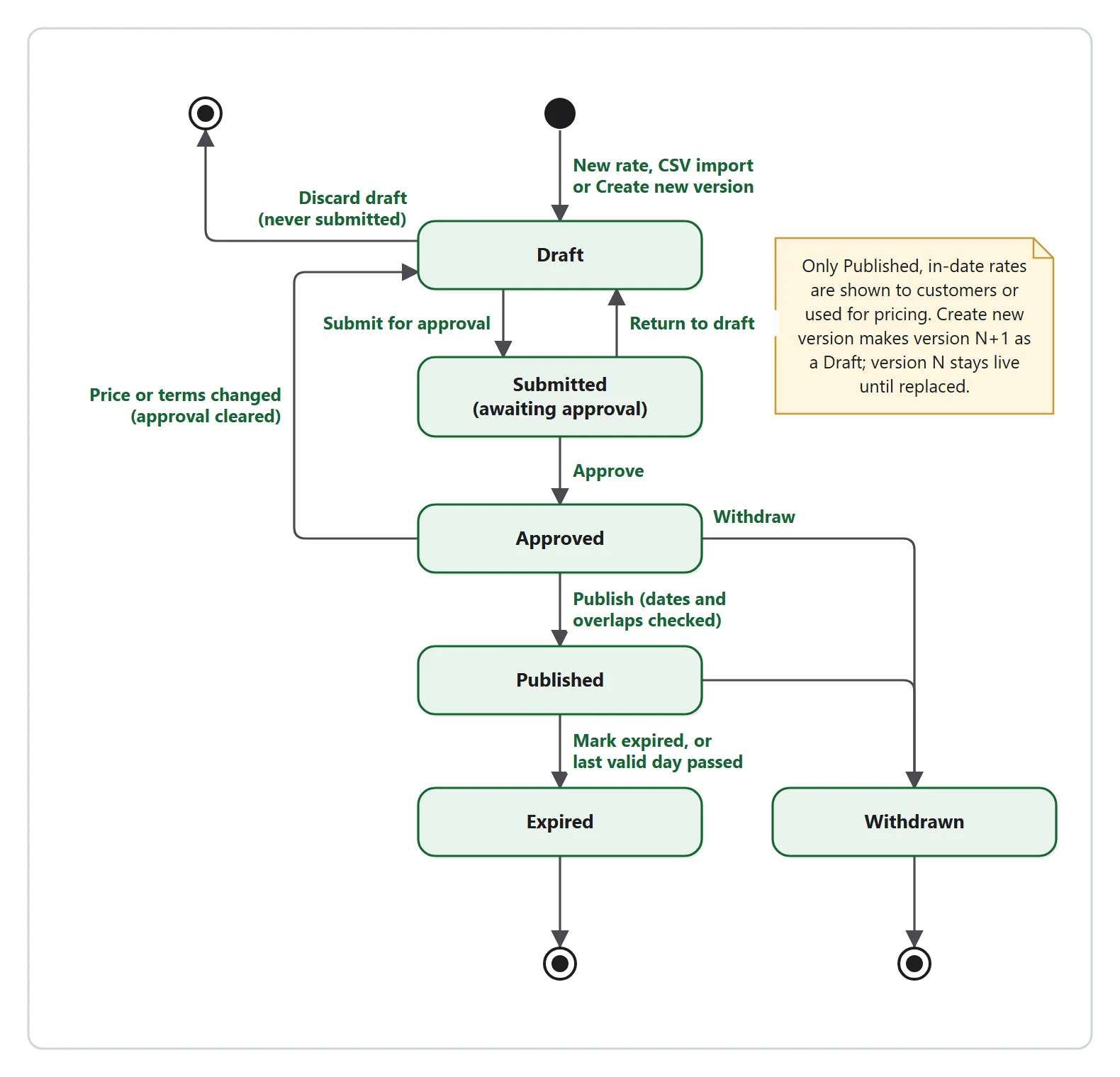
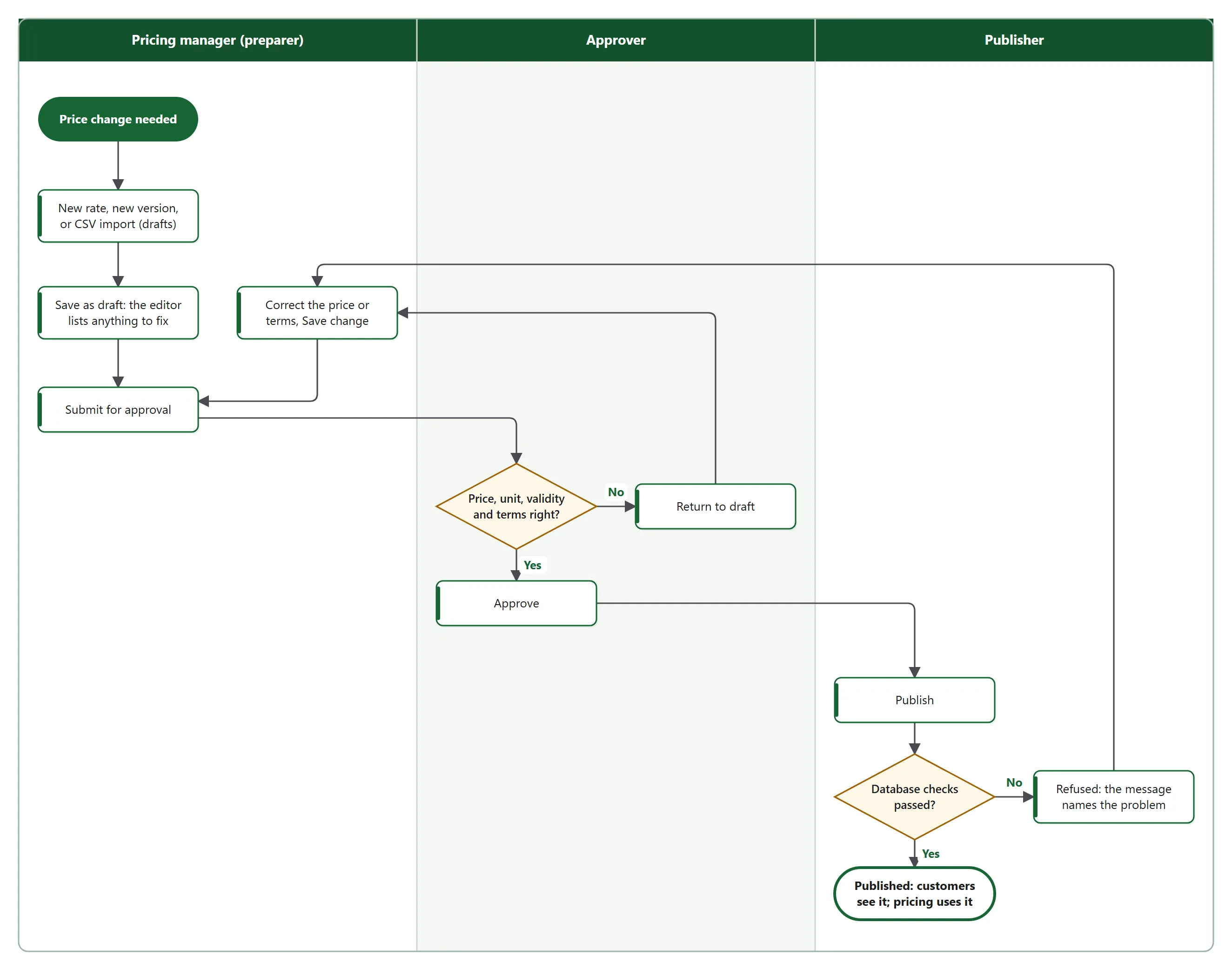
Table 5: Rate status transitions
| From | Button | To | Who | Database checks |
|---|---|---|---|---|
| (new) | Save as draft | Draft | Rate editors | All required fields; bands without gaps or overlaps |
| Draft | Submit for approval | Submitted | Rate editors | — |
| Draft | Discard draft | (deleted) | Rate editors | Never submitted; logged |
| Submitted | Approve | Approved | Rate approvers | — |
| Submitted | Return to draft | Draft | Rate approvers | — |
| Approved | (price or terms changed) | Draft | — | Approval cleared automatically |
| Approved | Publish | Published | Rate publishers | Unchanged since approval; last day not passed; no overlap with another published rate for the same service, route, customer and dates |
| Approved, Published | Withdraw | Withdrawn | Rate publishers | — |
| Published | Mark expired (or the last valid day passes) | Expired | Rate publishers | Hidden from customers from the day after its last valid day |
| Published | Create new version | new Draft (version N+1) | Rate editors | Version N stays live until N+1 is published |
PRC-02 Find rates
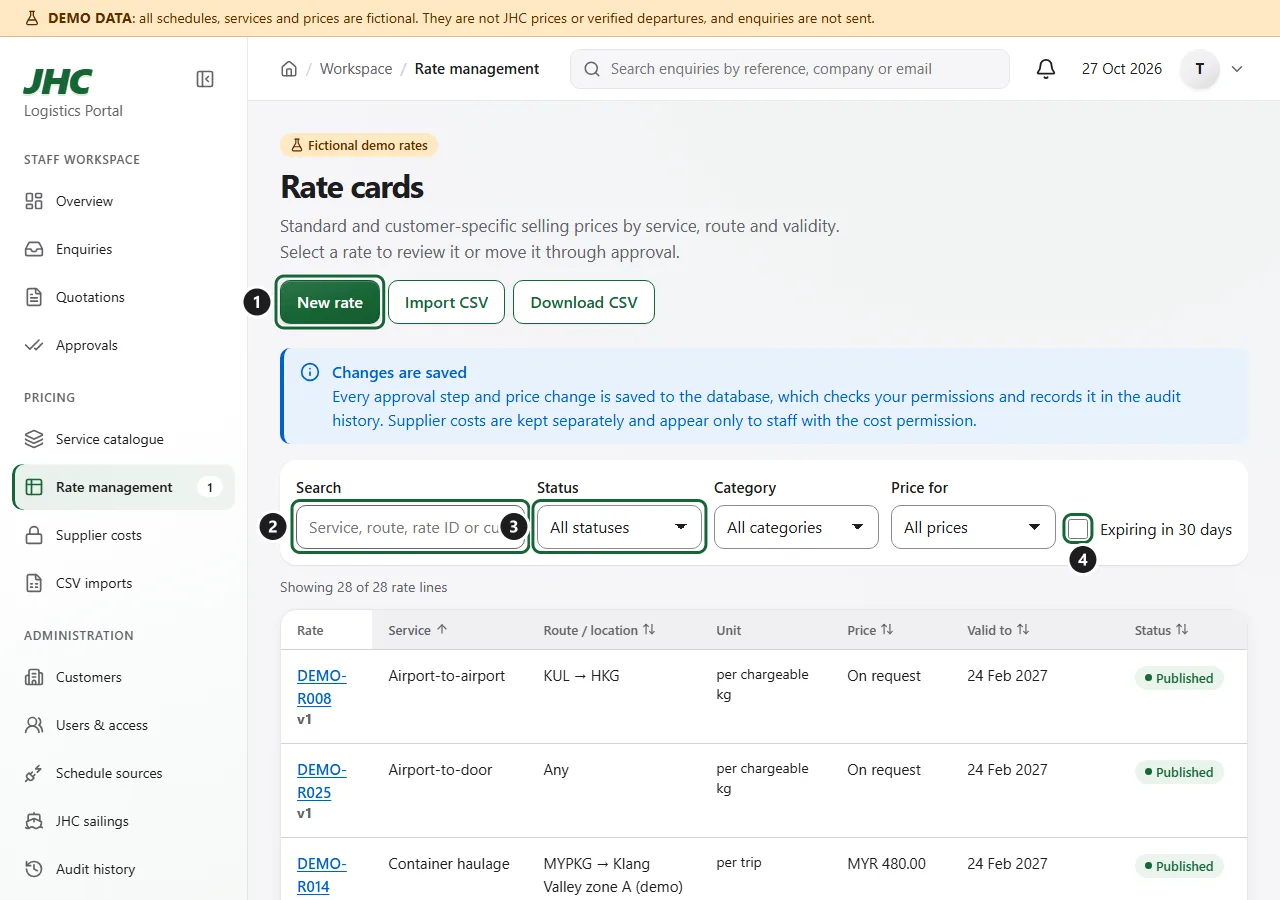
Use Search (2) (service, route, rate ID or customer), Status (3), Category, Price for (standard or customer) and Expiring in 30 days (4). New rate (1) starts a rate. Download CSV exports current rates in the import format (no costs).
PRC-03 Create a draft rate
| Who | Pricing manager, Administrator |
| Result | Draft rate with an ID such as R-000123 |
| Status | A · Verified |
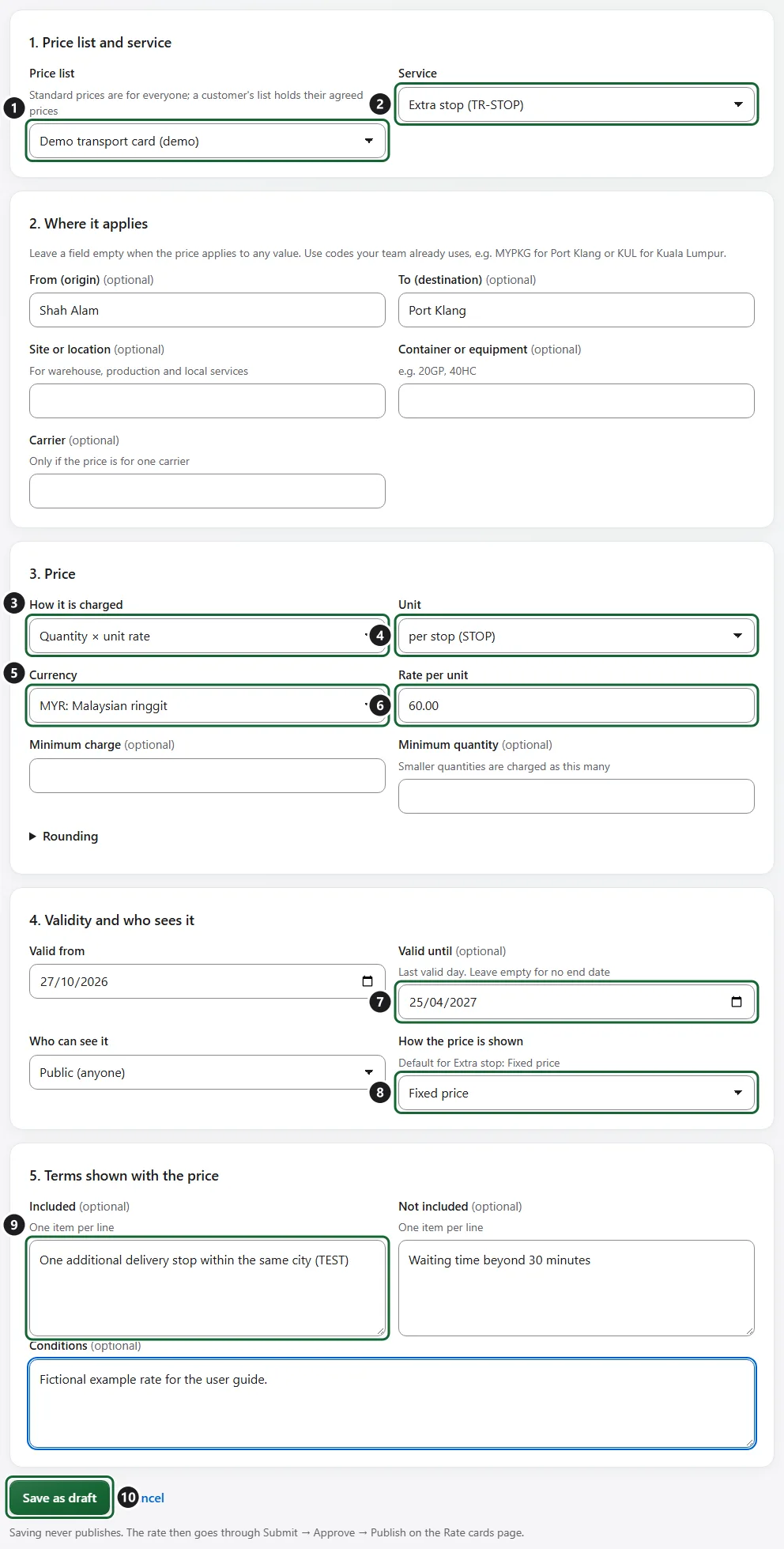
Table 6: PRC-03 steps
| Step | Field (callout) | Enter | Notes |
|---|---|---|---|
| 1 | Price list (1) | Standard list, or the customer's own list for an agreed price | + New price list… creates one |
| 2 | Service (2) | The service | |
| 3 | Where it applies | From / To, site, container type: only what matters | Empty = applies anywhere |
| 4 | How it is charged (3) | Fixed amount · Quantity × unit rate · Whole-quantity bands · Progressive tiers · Price on request | Bands are "from" included, "to" excluded |
| 5 | Unit (4) and Currency (5) | From Business settings | Similar units are never mixed |
| 6 | Rate per unit (6), minimum charge, minimum quantity | Minimum quantity applies first, then minimum charge | |
| 7 | Valid until (7) (and valid from) | "Until" is the last valid day | |
| 8 | How the price is shown (8) | Fixed price, "from" price, indicative estimate, or request only | Visitors see only types allowed in Business settings |
| 9 | Included (9), Not included, Conditions | Customer-facing terms | |
| 10 | Save as draft (10) | Problems are listed at the top; click one to go to the field |
PRC-04 Submit, approve or return, publish
| Status | A · Verified including a return and correction (EX-05) |
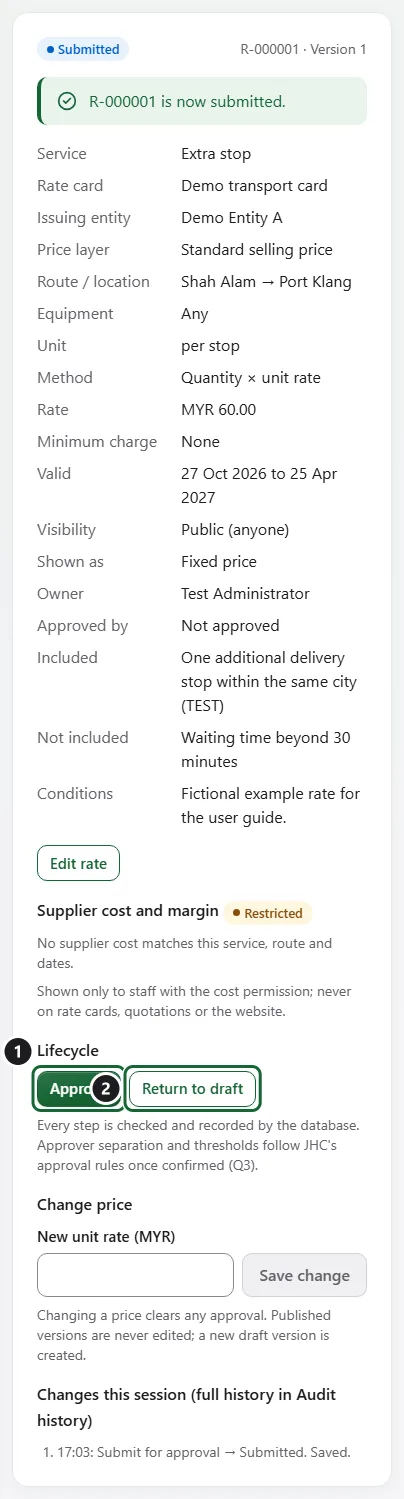
Table 7: PRC-04 steps
| Step | Who | Action | Expected result |
|---|---|---|---|
| 1 | Preparer | Submit for approval | "R-… is now submitted." |
| 2 | Approver | Check price, unit, currency, validity, visibility, terms; Approve (1) or Return to draft (2) | "is now approved." / back to Draft |
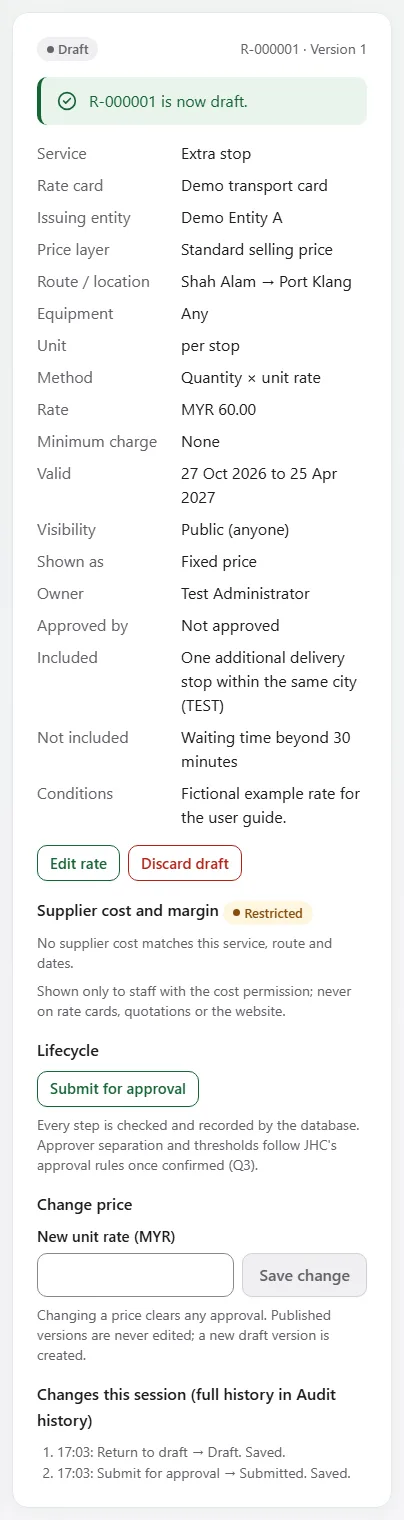
| 3 | Preparer (if returned) | Correct (e.g. New unit rate → Save change), submit again | |
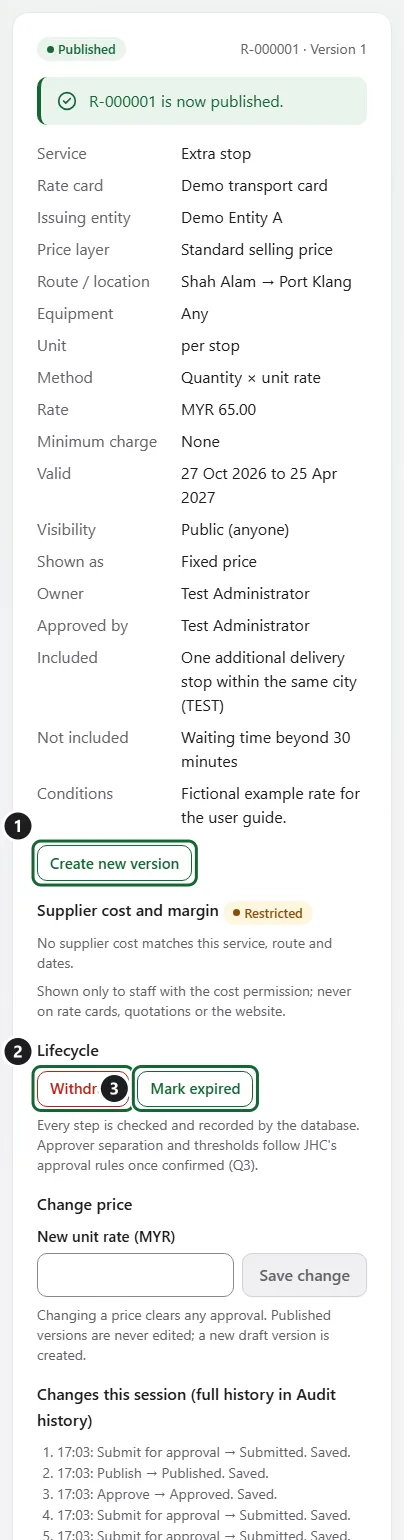
| 4 | Publisher | Publish | "R-… is now published." Visitors or the customer see it at once |
PRC-05 Revise, withdraw or expire
- Revise: Create new version (1). Version N stays live; N+1 goes through submit, approve and publish, then replaces N.
- Withdraw (2): removes a wrong price at once.
- Mark expired (3): ends it. A rate past its last day is hidden automatically; its status label changes to Expired the next time staff open Rate management.
PRC-06 Customer-specific (agreed) rates
Choose the customer's price list in Price list. The rest is the same. Only that customer's users see it, as Your agreed rate; the price check uses it before the standard rate. The database refuses to put one customer's agreed price on another customer's quotation.
PRC-07 Import rates from CSV
| Who | Pricing manager, Administrator ("Run CSV imports") |
| Result | Draft rates only |
| Status | A · Verified |
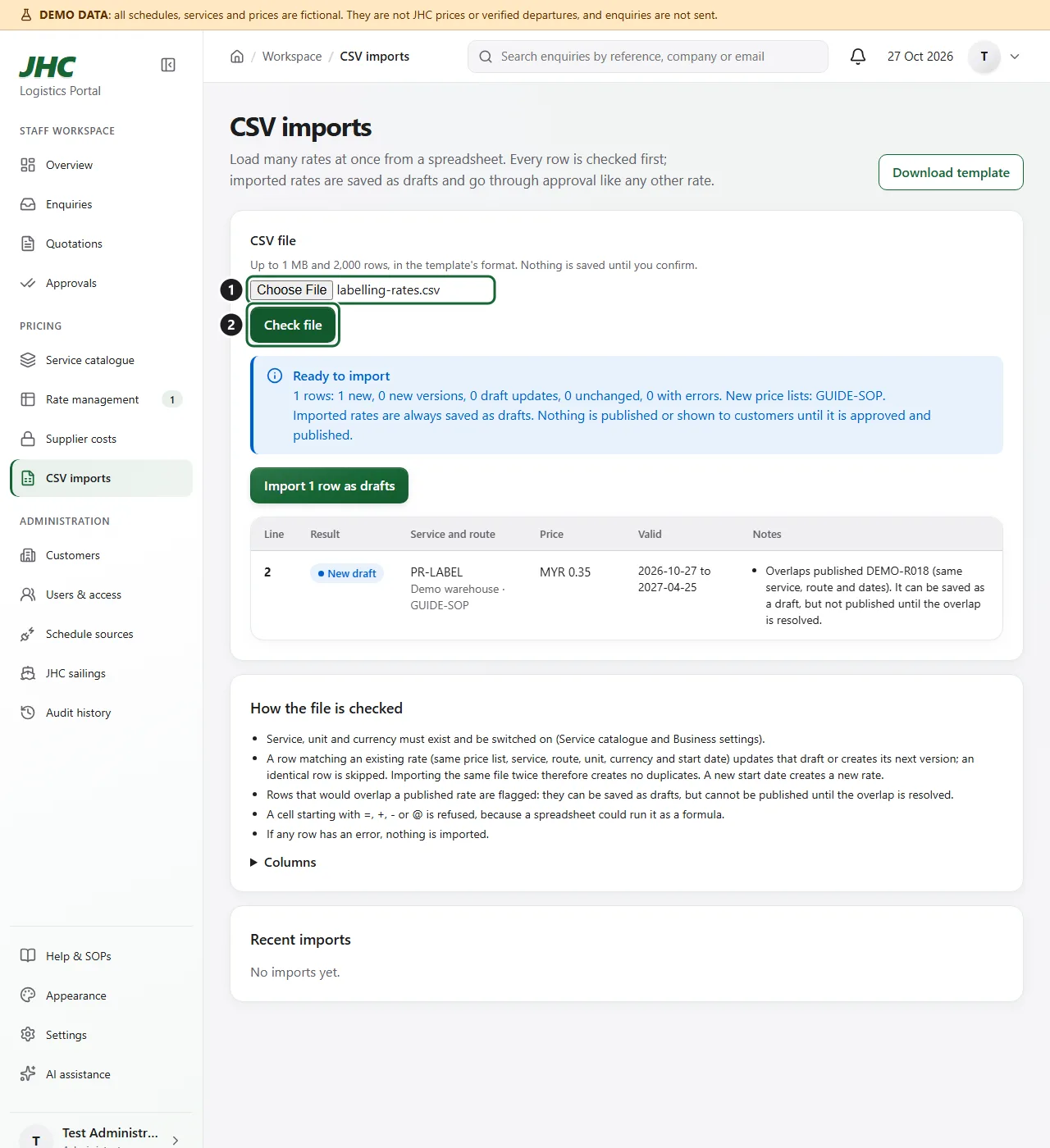
Table 8: PRC-07 steps
| Step | Action | Expected result |
|---|---|---|
| 1 | CSV imports → download the template; fill it in; save as CSV UTF-8 | |
| 2 | Choose the file in CSV file (1); Check file (2) | "Ready to import", or "Fix the errors, then check the file again" with each error |
| 3 | Import n rows as drafts | "Imported as drafts" |
| 4 | Submit, approve and publish the drafts as in PRC-04 |
Import example (fictional): one row for Labelling (PR-LABEL) at MYR 0.35 per unit, minimum charge MYR 50.00, at "Demo warehouse", on a new price list "GUIDE-SOP".
Rules: if any row has an error nothing is imported; importing the same file again creates no duplicates; a changed published rate gets a new draft version; cells starting with =, +, - or @ are refused.
PRC-08 Supplier costs and margins
| Who | Administrator, Pricing manager only |
| Status | A · Verified |
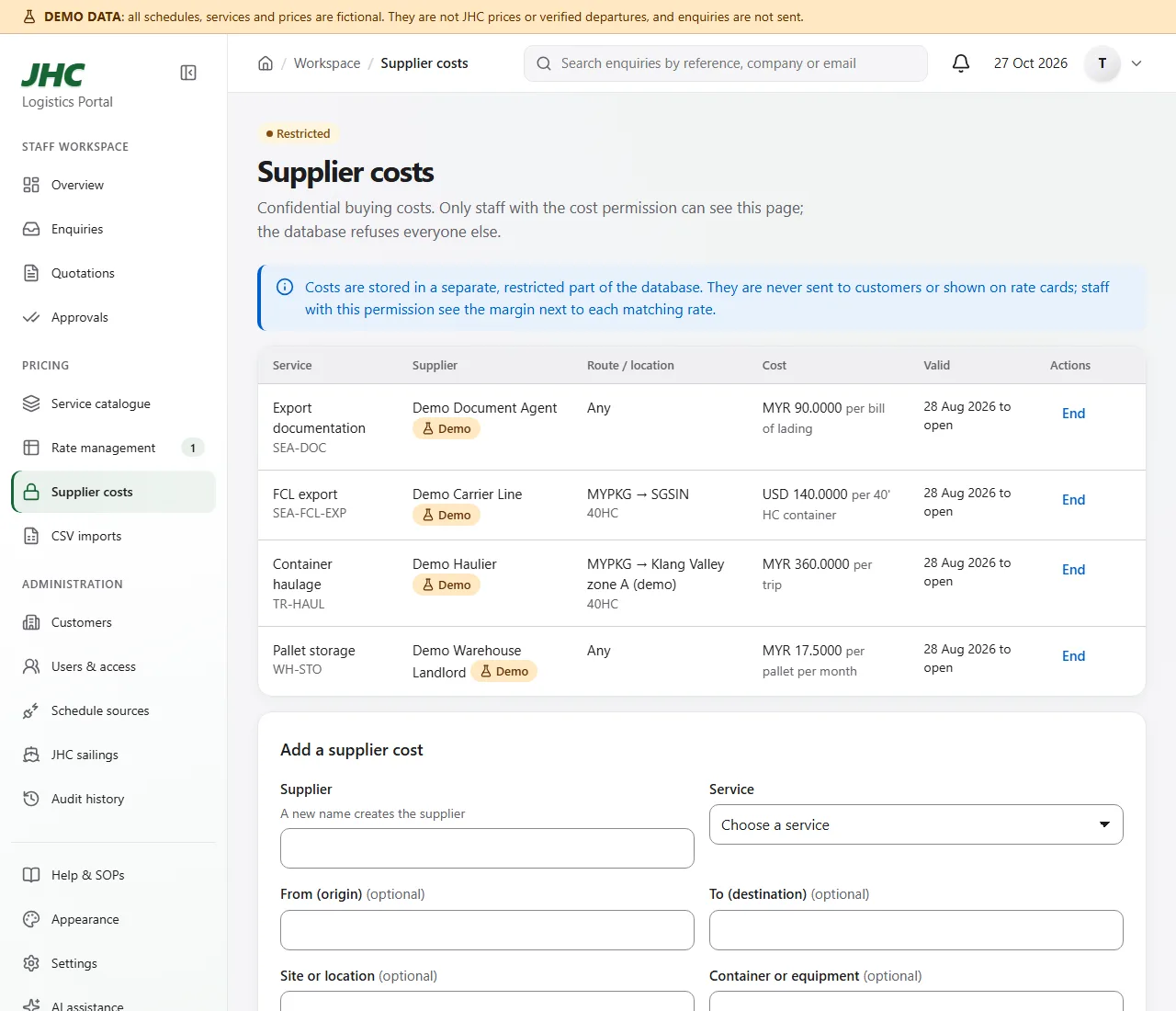
Enter Supplier, Service, Unit, Currency, Cost per unit, then Add cost. A rate with a matching cost (same service, route, unit and currency) then shows the margin to cost-permitted staff, e.g. "margin MYR 18.00 (37.5%)". Costs never appear to customers, in exports of selling prices, or in quotation PDFs.
4. Rate selection and quotations
PRC-09 How the portal selects a rate
- A price already on the quotation (copied) is never changed by later rate edits.
- Otherwise the customer's published, in-date agreed rate.
- Otherwise the published, in-date standard rate.
- Within one layer, the most specific match wins (exact route before any route).
- Two equally specific valid rates → "needs staff review": publication of the second is blocked, and the price check does not guess.
Drafts, submitted, approved-but-unpublished, expired and withdrawn rates are never used.
PRC-10 Missing-rate escalation
Table 9: Missing or unusable rate
| Situation | Preparer does | Pricing manager does | Target time |
|---|---|---|---|
| No rate for the route or service | Price by hand, or ask for a rate | Create and publish a rate (PRC-03, PRC-04) | Proposed: to be agreed by JHC |
| Rate expired | Ask for a new version | Create new version, publish | Proposed |
| Rule not supplied (volumetric factor etc.) | Enter the quantity yourself or price by hand | Ask JHC management to supply the rule | — |
| Ambiguous overlap | Price by hand if urgent | Withdraw or correct one rate | Proposed |
PRC-11 Quotation preparation, approval, issue and revision
Procedures STF-10 to STF-17 in the Staff User Manual are the operational steps. Control points:
- Submit freezes the version and records its SHA-256 content fingerprint.
- The approver approves that fingerprint. A changed version is refused.
- Issue is allowed only for an approved version whose content still matches. Issuing stores the PDF with its own fingerprint, supersedes the previous issued version, and marks the enquiry Quotation prepared.
- An issued version can never be changed or deleted by anyone; revisions are new versions.
Quotation example (fictional). The PDF produced in the TEST set-up for this manual is kept as docs/user-guides/images/raw/quotation-example.pdf. It shows the quotation number and version, enquiry reference, customer reference, lines with quantity, unit and currency, totals per currency, validity, payment terms, assumptions and exclusions, the content fingerprint, and the banner DEMO - NOT A REAL QUOTATION.
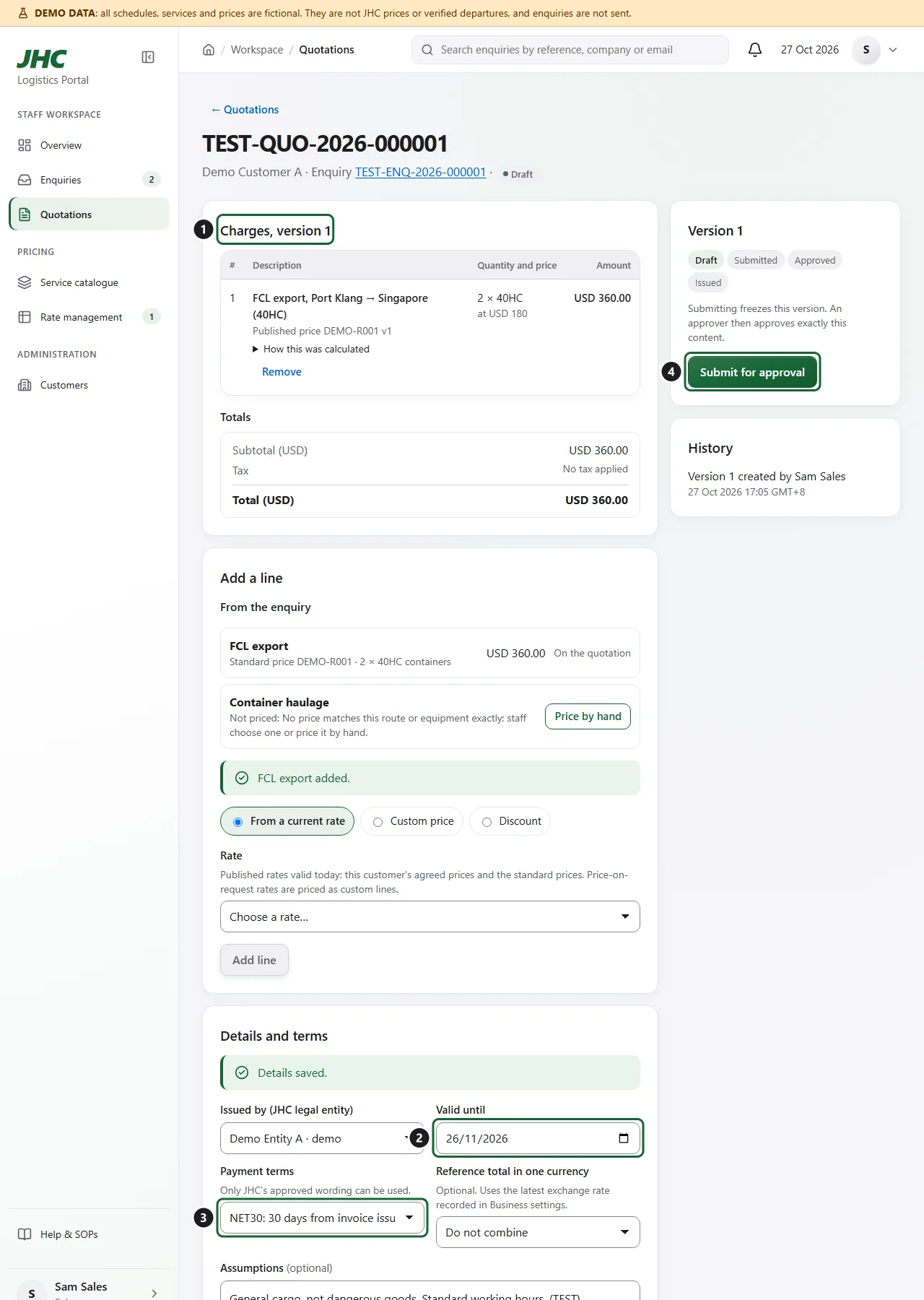
Table 10: Records kept (issue and revision history)
| Record | Where |
|---|---|
| Each version: lines, totals, terms, status, preparer, submitter, approver, times | Quotation page, Versions |
| Content and PDF fingerprints | Quotation page; printed on the PDF |
| Customer response and note | Quotation page; enquiry history |
| Who did what | Audit history (administrators) |