| Item | Detail |
|---|---|
| Document reference | JHC-UG-06 |
| Version | 0.1 |
| Status | Draft for review · Internal (section 3 may be adapted for customers) |
| Prepared | 27 October 2026 |
| Application version documented | Portal 0.3.0, commit 4d7b861 (staff assistant) plus uncommitted working-tree changes of 27 Oct 2026 (customer assistant) |
| Audience | Staff, administrators, and JHC management deciding on an AI pilot |
| Document owner | To be assigned (JHC) |
| Approver | To be assigned |
| Effective date | Not set: draft |
| Related documents | AI_STAFF_GUIDE.md (earlier staff guide), AI_PILOT_READINESS.md, AI_DATA_HANDLING.md, AI_EVALUATION_REPORT.md |
Table 1: Revision history
| Version | Date | Change | By |
|---|---|---|---|
| 0.1 | 27 Oct 2026 | First guide covering both assistants and the AI functions that are not built | Prepared with Claude (AI assistant) for JHC review |
1. What is real today
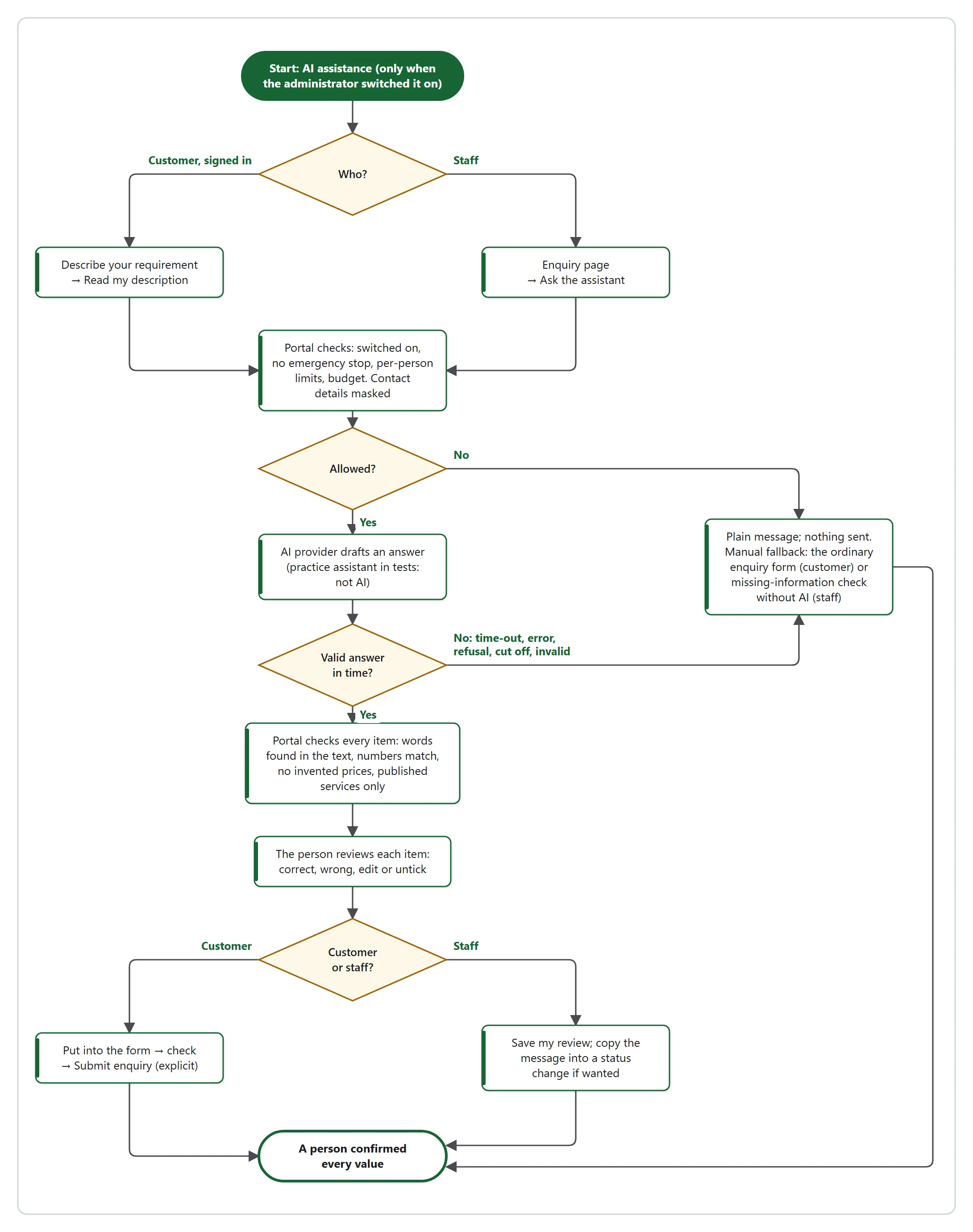
Warning: No real AI model has been connected or tested. JHC has no AI provider key yet, no model is chosen, and legal approval to send enquiry text to the provider is pending. Every picture in this guide shows the practice assistant: a few fixed rules built into the portal, labelled "Practice assistant, not AI". It shows how the screens and safeguards work, not how good a real AI model would be.
Table 2: AI functions: what exists
| Function | Exists? | Status |
|---|---|---|
| Customer "Describe your requirement" assistant | Built | B (practice assistant only) · live model C |
| Staff enquiry summary and details found | Built (enquiry assistant) | B · live C |
| Missing-information check | Built, no AI: uses the form's own rules | A · Verified |
| Service suggestions | Built inside both assistants (published services only) | B · live C |
| Approved-rate suggestions | Not built | D |
| Quotation wording drafts | Not built | D |
| Extraction from attached documents | Not built (files are never sent to AI) | D |
| Schedule explanations | Not built | D |
AI drafts text; it never calculates prices. All prices come from rates and the pricing rules (JHC-SOP-02). The portal removes any price an assistant invents.
2. Staff: the enquiry assistant
AI-01 Missing-information check (no AI)
| Entry point | Staff enquiry page → Enquiry assistant → Missing information |
| Input | The enquiry as saved |
| Sent externally | Nothing |
| Output | List of missing items (Form rule or Proposed check) and a message in English or Bahasa Malaysia |
| Status | A · Verified. The question wording is a draft awaiting JHC approval (B8) |
Steps: JHC-UG-02 STF-05 and STF-06.
AI-02 Ask the assistant (staff)
| Entry point | Staff enquiry page → Ask the assistant (only if switched on) |
| Required input | A saved enquiry |
| Sent to the provider | The enquiry's own text and service details, and customer replies, with phone numbers and emails masked; JHC's published service list. Not sent: names, company, emails, files, internal notes, rates, costs |
| Output | Summary; details found, each with "Found in the enquiry: …"; services possibly also needed; points to check; suggested questions |
| Checks before you see it | Every quote must exist in the enquiry; numbers must be in their quote; invented prices removed; unknown or hidden services removed. Removed items are listed under Removed by the portal's checks |
| Human review | Mark each detail Correct / Wrong (with Correct value); each service Needed / Not needed; each point Valid / Not valid; edit the summary |
| Confirmation | Save my review. The enquiry itself is never changed |
| Status | B (practice) · live C |

Table 3: AI-02 steps
| Step | Action | Expected result | If not |
|---|---|---|---|
| 1 | Ask the assistant | Within about 30 seconds: AI draft: check every item (1); on the test copy also Practice assistant, not AI (2) | A plain message (off, stopped, busy, over a limit, or failed): use the missing-information check |
| 2 | Compare every item with its Found in the enquiry quote (3) | Watch for a right value from the wrong place (e.g. destination given as origin) | |
| 3 | Mark and correct each item | Questions for services marked Needed are added to the message | |
| 4 | Save my review (4) | "Review saved. The enquiry itself has not been changed." | |
| 5 | If you want to ask the customer, copy the message into Change status → Awaiting information | Only that step reaches the customer |
3. Customers: "Describe your requirement"
AI-03 Customer assistant
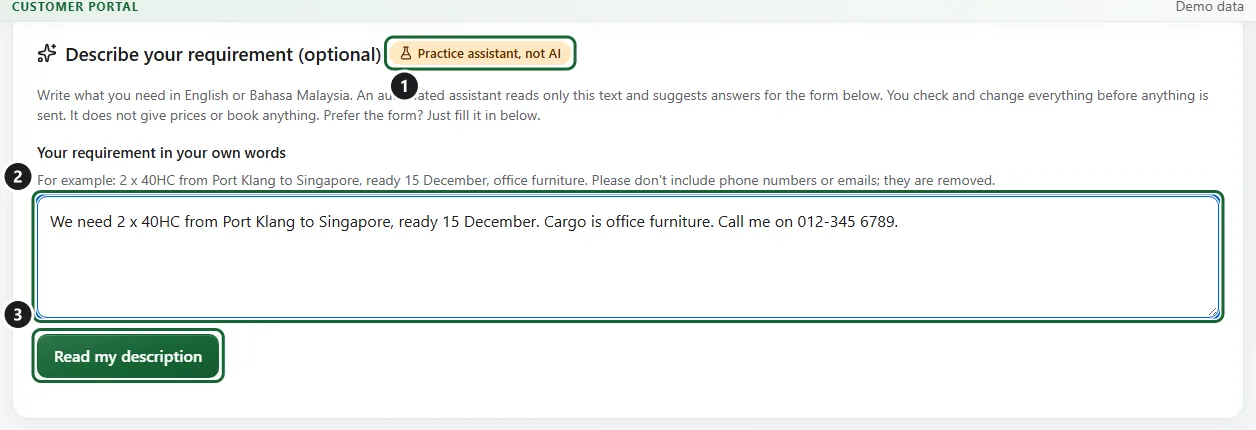
| Entry point | Request a quotation, card Describe your requirement (optional): signed-in customers only, when switched on |
| Required input | The customer's description, 10 to 2,000 characters, English or Bahasa Malaysia |
| Sent to the provider | That text with phone numbers and emails masked, and JHC's published service list. Nothing else; nothing typed is stored by the assistant |
| Output | Suggested services and form values, each with "From your words: …"; You will still need to fill in; Please check notes |
| Checks | Value must quote the customer's words; numbers in the quote; units stated (tonnes converted exactly); dates written out and not in the past; values pass the form's own rules; prices and unpublished services never used |
| Human review | Correct a value or untick Use this; untick a service |
| Confirmation | Put into the form (nothing is sent), then the customer checks the ordinary form and selects Submit enquiry |
| Status | B (practice) · live C |
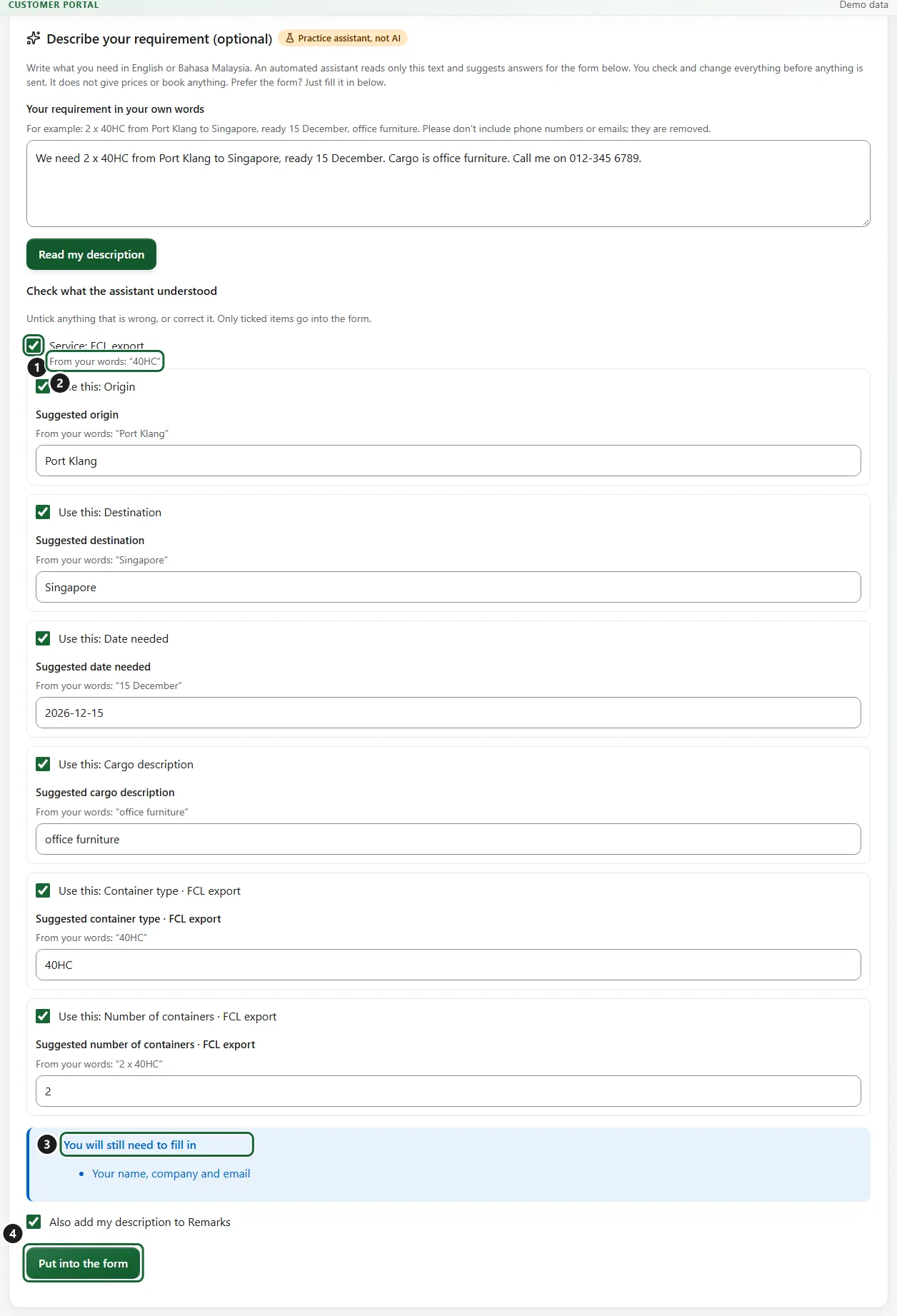
Limitations (on purpose): numbers written as words ("dua kontena"), relative dates ("next week") and amounts without units are left for the customer to fill in. If the text contains instructions to the assistant (e.g. "ignore previous instructions"), a Please check note says they were not followed.
4. Failures and manual fallback
Table 4: What happens when AI is unavailable
| Situation | Customer sees | Staff see | Fallback |
|---|---|---|---|
| Switched off | No assistant card | No Ask the assistant | Ordinary form / missing-information check |
| Emergency stop | A short message | "emergency stop" message | Same |
| Over a per-person or total limit, or budget reached | A short message | Same | Same |
| Time-out, provider error, refusal, cut-off or invalid answer | "…fill in the form below" | Plain message | Same |
Every request is recorded (who, when, outcome, time, estimated cost) without any enquiry text.
5. Administration and cost
Settings: JHC-UG-03 ADM-08. Before a real model is used:
- JHC legal approves sending masked enquiry text to the provider (B3).
- Zero data retention is requested from the provider (B4).
- A model is chosen and the evaluation is run and reviewed (
npm run ai:eval, see AI_EVALUATION_REPORT.md). - Staff assistant first, for two weeks; then the customer assistant for pilot customers.
Table 5: Estimated cost per request (US$, estimates from published prices, 27 Oct 2026; not measured)
| Model | Customer assistant | Staff assistant |
|---|---|---|
| Claude Opus 5.5 | ≈ 0.02–0.04 | ≈ 0.02–0.06 |
| Claude Sonnet 5.5 | ≈ 0.01–0.02 | ≈ 0.01–0.03 |
| Claude Haiku 5.5 | ≈ 0.001 | ≈ 0.001–0.002 |
The monthly budget is US$10 by default; at the limit the assistants stop. Details: AI_PILOT_READINESS.md.